Create your deliverables
Download a photo pack
Collect product images for a presentation.
Read the transcript
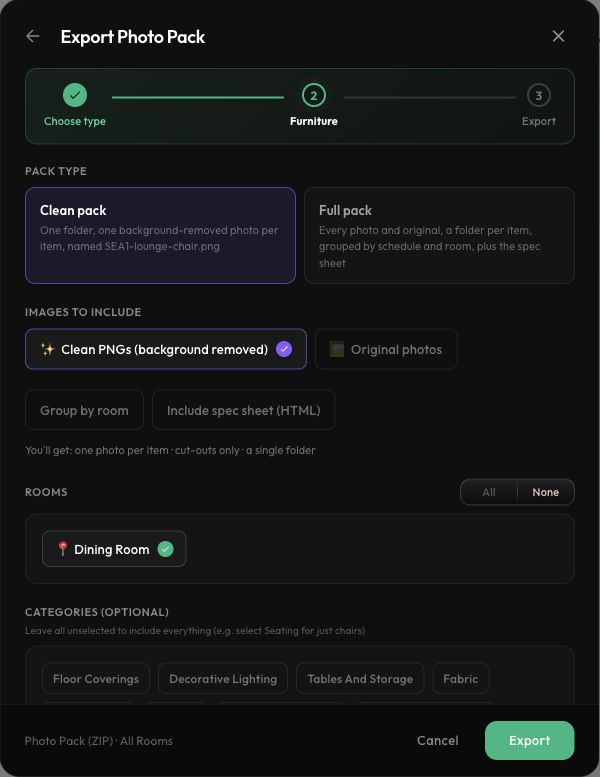
Choose Export Photo Pack. Clean pack requests one background-removed image per item. Full pack includes additional photos and supporting files. Select the rooms and review the options before Export. The export may wait in the queue. The details page updates automatically. You can return to FF and E Exports to find the job later. Our Clean pack reached Complete with six items from one room. Choose Download dot ZIP. The saved options show background-removed images and a flat folder structure. Locate the ZIP in your downloads, unzip it, and inspect the images before using them in a presentation. The demo verified generation and the download control; local archive inspection remains to be completed.
Before you start
- Product images checked in the project.
Step by step
- 1
Choose the pack
Choose Clean pack for one background-removed image per item, or Full pack for all photos and supporting files.
- 2
Select the scope
Select rooms and review image and grouping options. Leaving every category unselected includes all categories.
- 3
Export and inspect
Choose Export, download the ready ZIP from FF&E Exports, and unzip it. Check images, especially transparent or reflective products.
- 4
Correct the source when needed
Fix an incorrect source or cover image on the product, save, and generate a new pack.
Check the result
The ZIP opens and its images are suitable for the intended presentation.