Create your deliverables
Export and inspect an FF&E schedule
Generate PDF or Excel and verify the actual download.
Read the transcript
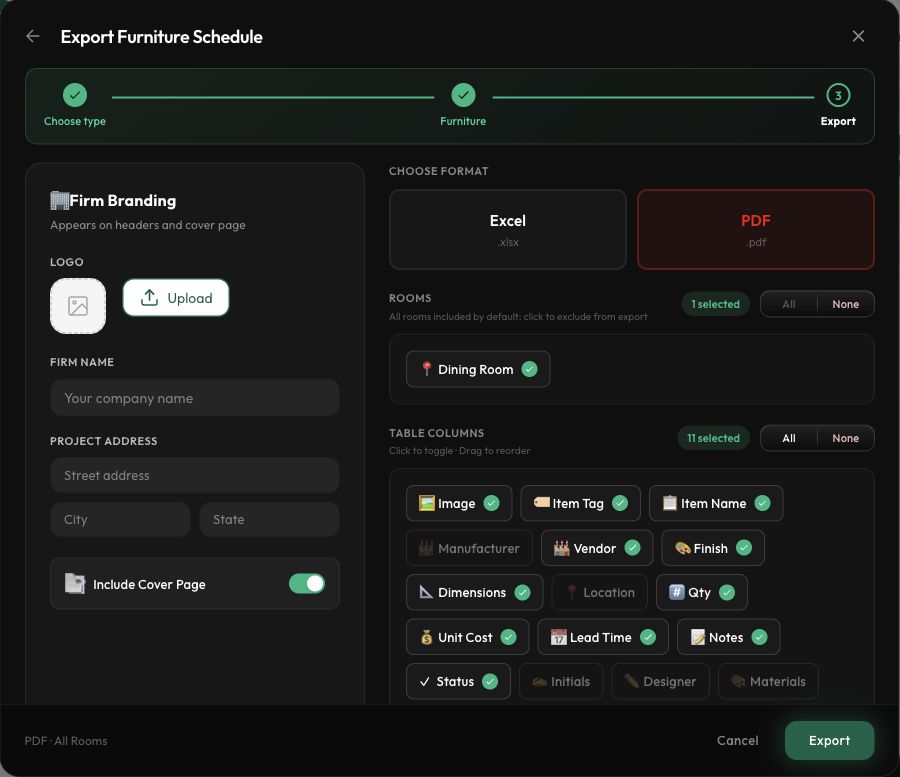
Open Export FF and E and choose Export FF and E Schedules. Select the schedule you want to deliver. A photo pack and an editable presentation are separate export paths. Select PDF or Excel, then review the rooms and columns. For this example we selected the Living Room furniture, PDF, and a cover page. Choose Export. The export details show the status, selected options, item count and generated files. Once Complete appears, scroll to Files and choose Download dot PDF. Open the PDF and inspect all pages. Our six-item schedule included the edited chair quantity and lead time. Currency labels used a plain dollar sign, so confirm the intended currency before sharing.
Before you start
- Reviewed product details, rooms, and quantities.
Step by step
- 1
Choose the output
Choose Export FF&E Schedules and select the schedule. A single schedule offers PDF or Excel; Whole project (all schedules) produces an Excel workbook.
- 2
Review what will be included
Check the rooms, table columns, format, and firm branding. Selected columns have a check mark; reorder them as needed.
- 3
Generate and find the file
Choose Export. The observed PDF workflow opened its export detail page and reached Complete with an item count. Queued, Pending, or Generating is still in progress.
- 4
Download and inspect
Under Files, choose Download .pdf. Depending on your browser, this opens a PDF viewer in a new tab. Inspect every page, including quantities, units and currency labels. The observed PDF used $ for rows that showed CA$ in the project, so resolve currency ambiguity before sharing.
- 5
Use export history for recovery
If an email attachment is missing, download the file from FF&E Exports. Generate a fresh export after changing the project.
Check the result
The downloaded file opens and contains the intended products, quantities, prices, and specifications.
Keep exploring
Download a photo pack
Collect product images for a presentation.
0:45 · Narrated tutorialPrepare and review a client proposal
Choose products, check pricing, and inspect the generated PDF.
0:53 · Narrated tutorialFind a missing or outdated export
Use export history and saved proposal state to find the right document.
0:48 · Narrated tutorial