Bring in your products
Import supplier links
Bring products into Casa and distinguish submitted links from completed imports.
Read the transcript
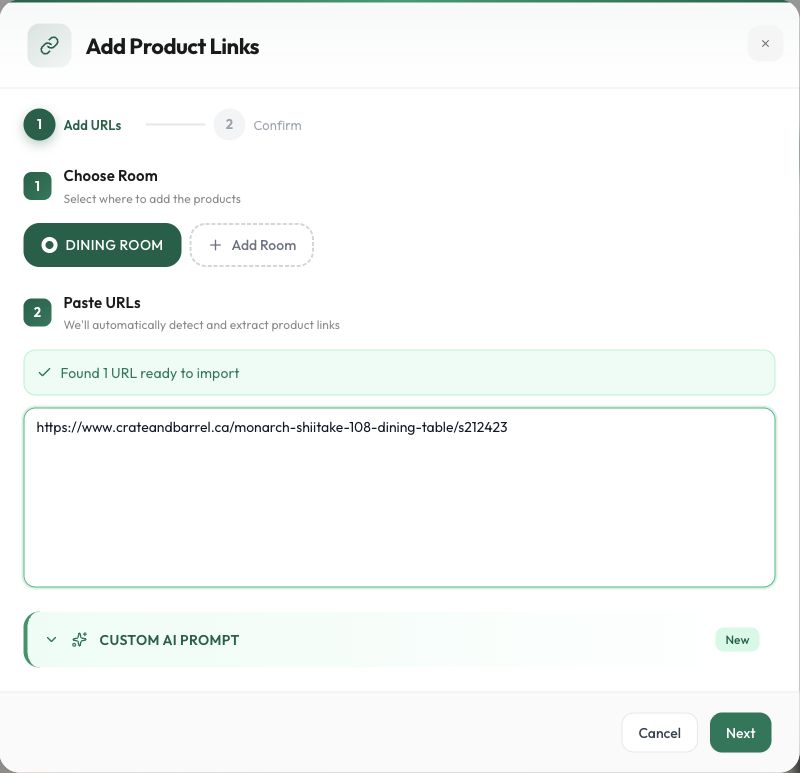
Open Add Furniture URL in the destination room. Paste individual supplier product pages, one per line. Check the selected room, then choose Next. Review every detected link before choosing Confirm Import once. If the list is wrong, go Back and correct it. A submission message means the request was accepted. The new card can appear while its details are still loading. Text and images may arrive at different times. Check the card before deciding to retry. Our sample links produced product cards. Open the supplier source and check the selected variant, quantity, price, currency, dimensions and lead time. Importing starts the review; it does not finish it.
Before you start
- Edit access to the destination project.
- Individual product pages that open without a supplier login.
- Available import credits.
Step by step
- 1
Choose the product pages
Use individual supplier product URLs. Avoid search results, collections, shopping carts, and account pages. Note the size and finish you intend to use.
- 2
Paste and check the batch
Choose Paste product links in the onboarding tour or Add Furniture URL in an empty room. Select the room, paste the links, and choose Next. Choose Back to correct the detected list.
- 3
Start extraction
Check the destination room and detected URLs. Choose Confirm Import once. A success toast confirms submission; text and images can still be loading. The observed confirmation screen did not show a credit estimate.
- 4
Check completed results
Inspect progress and errors. Find the cards across schedule tabs if necessary, then compare their details with the source. Do not resubmit the whole batch simply because one item is incomplete.
Check the result
The intended cards exist in the project and their import outcomes have been checked.
Keep exploring
Find, move, assign, and duplicate products
Choose the right room, schedule, and kind of reuse.
0:52 · Narrated tutorialRecover an incomplete import
Find the actual state before retrying or creating duplicates.
0:44 · Narrated tutorialReview and correct product details
Turn extracted information into a selection you can confidently use.
0:46 · Narrated tutorial